

Understanding the fields
Import Data / Export Data
Import brings in products, customers, or other records from a spreadsheet — see Importing existing data. Export saves your products, customers, vendors, or invoices to CSV, handy for Excel or your accountant. Export is Windows-only.Local Backup & Restore
Take an encrypted backup of your store’s data to a local file, and restore from one if needed. See Backing up your data and Restoring from backup for the full guides.Cloud Backup
This is a paid add-on — until it’s active on your plan, this screen only explains what it does; once enabled, it shows real controls:- Backup now — takes an immediate encrypted backup to the cloud instead of waiting for the automatic schedule.
- Last backup time / status — confirms at a glance whether your store’s data is currently backed up off your device.
- Storage usage — how much of your plan’s cloud storage this store is using.
- Backup history — a list of previous backups, each individually restorable or deletable.
Cloud Backup only appears fully functional once the add-on is active on
your plan — without it, the screen is an explainer/upsell rather than a
working backup control.
External Database
An advanced, Windows desktop-only option for larger multi-counter setups — point BillBasket at an external PostgreSQL server instead of the default local encrypted SQLite file. A store must already be registered before this option is available, since the connection is saved per store.- Host / Port — the server’s address (hostname or IP) and port
(defaults to
5432, Postgres’s standard port). - Database name — the specific database on that server to use.
- Username / Password — credentials for connecting.
- Use TLS — keep this on for any server not running on the same computer, so the connection is encrypted.
- Test connection — you must successfully test the connection before either switch option below becomes available; editing any field after a successful test clears that “tested” state and requires testing again.
- Copy data & switch — copies everything in your current store (customers, products, bills, stock, settings) to the server, verifies the copy matches, then reopens the store from there. Your local copy stays untouched as a backup. This is the recommended path for an existing store.
- Switch to an empty database — an advanced alternative that starts the server database empty rather than copying existing data; only sensible for a brand-new store, since none of your current data appears there until a future migration tool copies it across.
- Use local database (only shown once a store is on PostgreSQL) — reverts to the local encrypted file. Anything entered while on the PostgreSQL server is not copied back automatically.
Most shops won’t need External Database — it’s meant for setups that have
outgrown a single local database across several counters. Only the
desktop host connects to Postgres directly; any paired phone clients
keep working over the network exactly as before.
See it on your device
- Windows PC
- Phone
- Tablet
The Data section of Settings — Import Data, Export Data, Local
Backup & Restore, Cloud Backup, and External database all grouped
together, with Local Backup & Restore open showing its schedule and
snapshot list.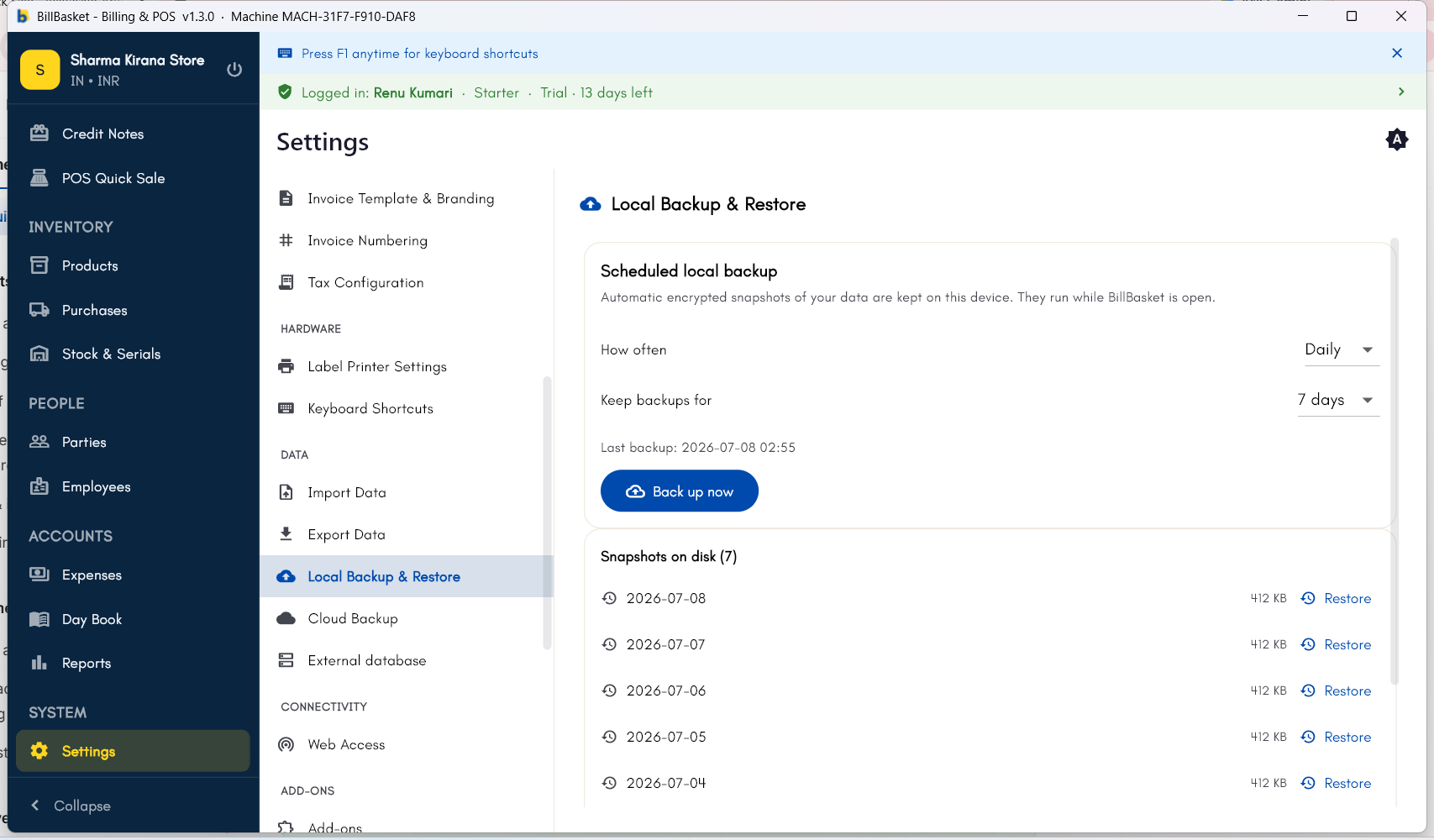
Try it: Bali Electronics
1
Export the product list
Vikram Bali wants to review his current stock in Excel, so on the
Windows PC he opens Settings → Data → Export Data and exports his
products to CSV.
2
Turn on Cloud Backup
He then opens Settings → Data → Cloud Backup and enables it, so his
store’s data is backed up automatically to his BillBasket account. He
checks back later to confirm the last backup time looks recent.