

Understanding the fields
- Name — what shows on the bill and in product search. This is the only field you truly can’t skip.
- SKU — your own internal code for the item. Leave it blank and BillBasket assigns one automatically when you save, so you never have to invent codes by hand.
- Barcode — the code a scanner reads. If you turn on auto-assign barcode and leave this blank, BillBasket generates one from your store’s barcode series on save; once a barcode is assigned it won’t be regenerated later, so it’s safe to print labels right after saving.
- Category — groups the product for reporting and browsing (e.g. “Groceries”). Optional, but makes the product list easier to navigate as your catalog grows.
- Manufacturer/brand — an optional link to a brand, useful for filtering and for suppliers who deal in specific brands.
- Unit of measure (UOM) — how the product is sold and counted (piece, kg, liter, etc.). Defaults to “pcs.” See Units of measure for how this interacts with billing.
- Cost price and selling price — what you paid versus what you charge. Only selling price is required; cost price is optional but powers margin reports.
- MRP — the printed maximum retail price, if different from your selling price. Optional.
- Tax rate — the tax slab applied on this product’s bills. You can also mark the price as tax-inclusive, in which case BillBasket works the tax backward out of the price you entered instead of adding it on top.
- Product type — Simple (the default, a single stocked item),
Variants (a parent item with multiple size/color options), or Bundle
(a set of other products sold together). This choice changes what
else you can set:
- Track Serial Numbers only applies to Simple products — it’s switched off and locked for Variants and Bundles, since individual serial capture doesn’t make sense for a multi-variant parent or a bundle of other items.
- Track batches/expiry is available for Simple and Variant products but locked off for Bundles, since a bundle’s stock comes from its component items, not its own lot.
- Manage stock — turns inventory tracking on or off for this product. When it’s off, the product can still be billed, but BillBasket won’t track a quantity for it (useful for made-to-order or non-stock items). Turning it off hides the opening stock and low-stock fields entirely, since they wouldn’t mean anything.
- Opening stock — how many units you currently hold, entered only when you first create the product. Once saved, this becomes a read-only “current stock” display — later stock changes go through sales, purchases, or a stock adjustment instead, so the count always has a clear paper trail.
- Low-stock alert — the quantity below which BillBasket flags the product as low stock in Inventory. Only shown when Manage stock is on.
- Track Serial Numbers and Track batches/expiry — two independent toggles for high-value items sold one-by-one (serial) or perishable/ lot-controlled items (batch/expiry). Both can be on together for a product that needs both. See Tracking serial numbers for the serial workflow.
See it on your device
- Windows PC
- Phone
- Tablet
The New Product form on desktop, with a name and selling price
entered and a category picked from the catalog. On the right, the
Tracking and Suppliers toggles are all off by default — this is
a Simple product with no serial/batch tracking, and no linked
supplier yet.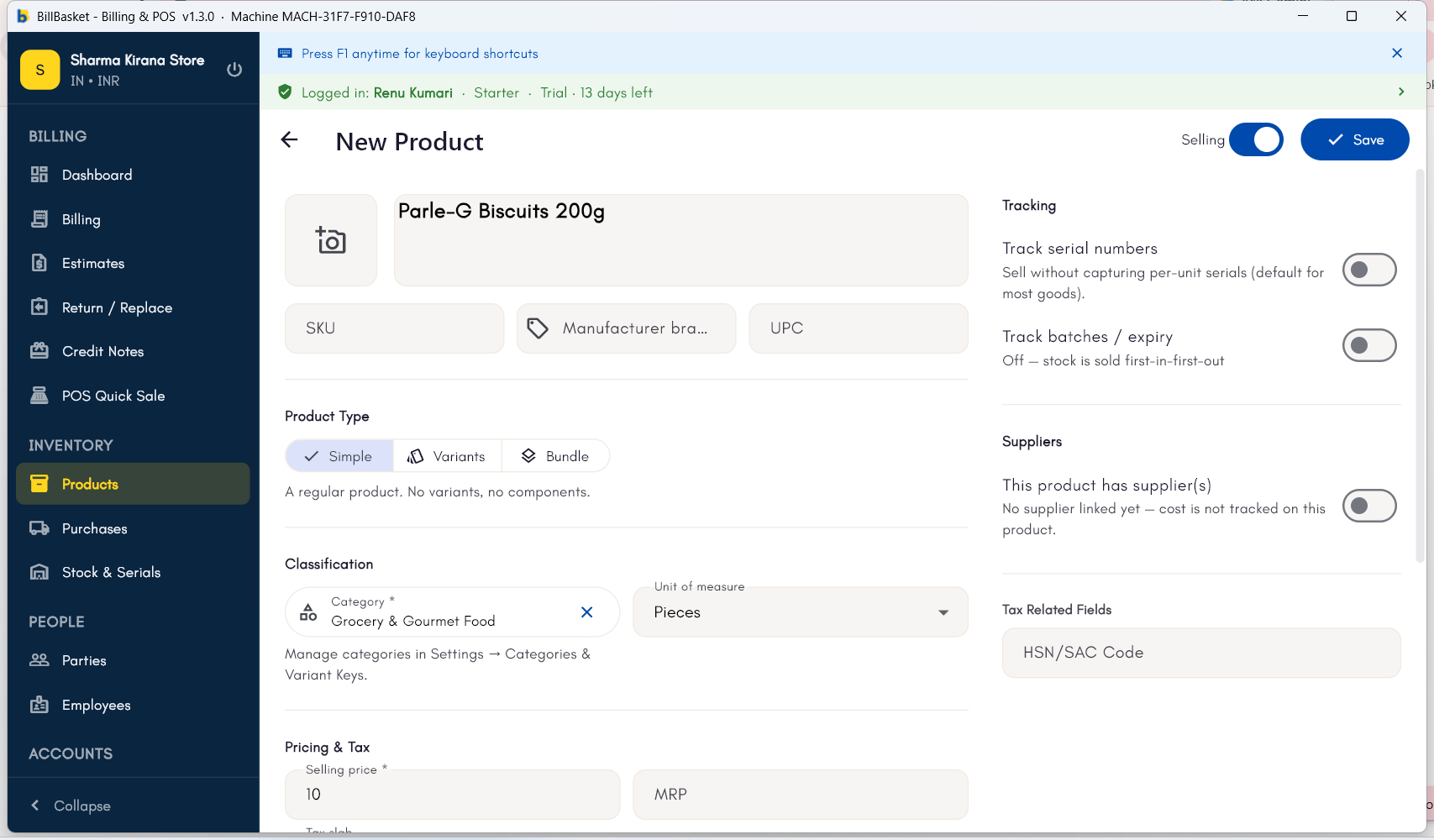
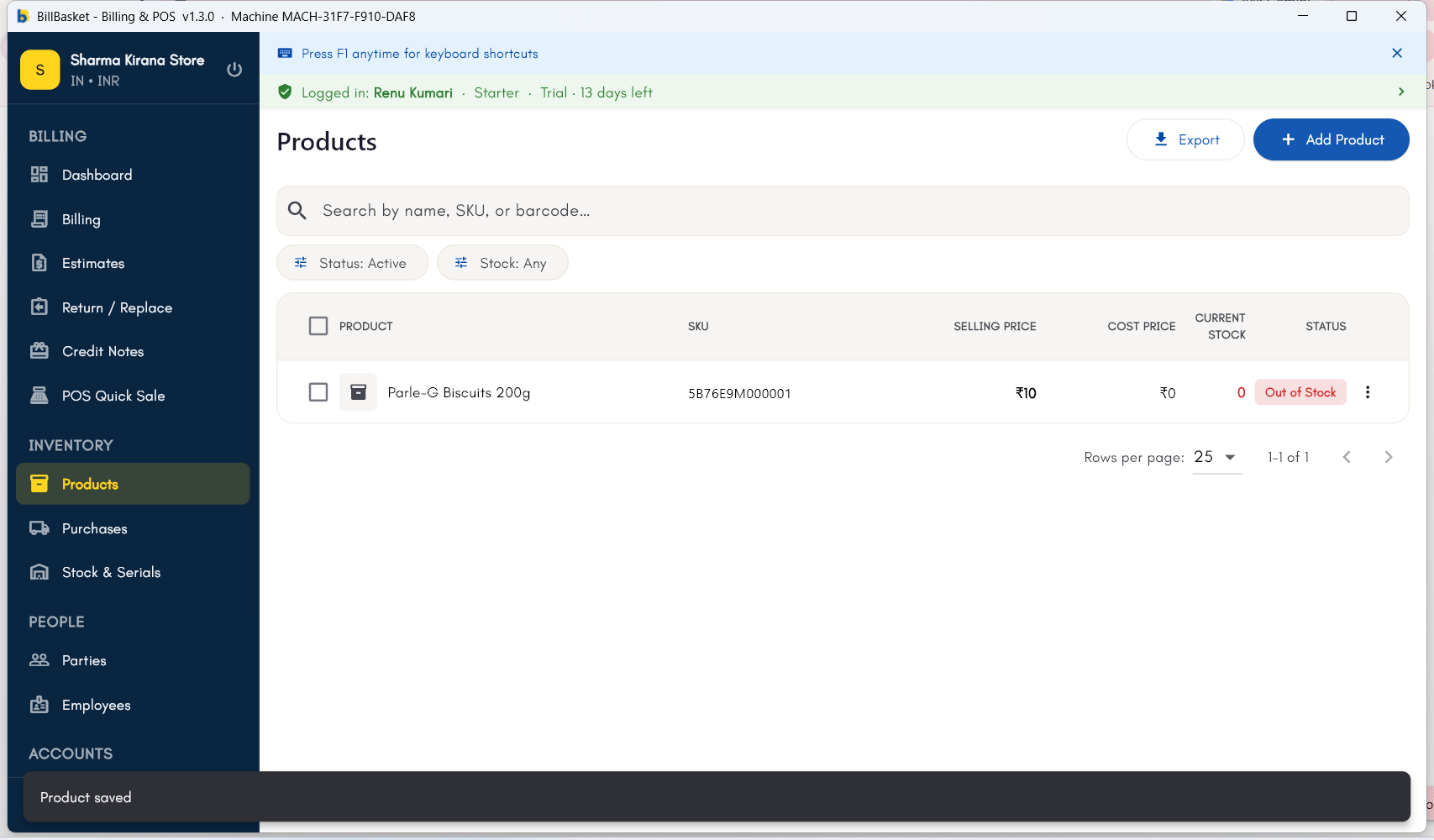
Try it: Sharma Kirana Store
1
Open Products and start a new product
Rajesh Sharma has a new stock of Tata Salt 1kg to add before it can be
sold. He opens Products → New Product.
2
Enter name, price, and tax rate
He types “Tata Salt 1kg” as the name, sets the price to ₹28, and picks
the applicable tax rate and category (“Groceries”).
3
Leave SKU and barcode blank
Since the packet doesn’t have a scannable code handy, Rajesh leaves the
SKU and barcode fields blank — BillBasket auto-generates them.
4
Set opening stock and save
He enters the opening stock count of 40 packets and saves. Tata Salt
1kg is now ready to bill and shows up in inventory tracking right away.