

BillBasket doesn’t show a remote list of every other signed-in device from
this screen — it shows the status of the device you’re currently using.
To free up a slot, sign out from the old device itself (or reset your
account online at Manage account).
Understanding the fields
- Licensed to — your account’s business name, owner name, mobile number, and email, shown read-only. This comes from your BillBasket account, not from this device, so it stays the same no matter which device you sign into.
- Package — your current plan name (for example, a trial or a paid package tier).
- Trial Stores / Pro Stores — shows how many stores your plan allows at each level, as “X of Y” (for example, “1 of 2”). If you’re using a trial store and haven’t reached your Pro Store limit, an Activate this store button appears — this converts the current store from trial to a paid Pro slot without losing any data. If your Pro Store count is already at its limit, activating a new store isn’t possible until you free one up or upgrade your plan.
- License status — whether the current lease (BillBasket’s offline proof that this device is entitled to run) is valid, expired, or needs attention. This is what lets the app keep working for a while even without internet.
- Valid until / days left — the date the current lease needs to renew by, and how many days remain. BillBasket renews this automatically in the background roughly every 6 hours while online, so you normally never see it lapse.
- This device and Machine ID — an identifier unique to this installation, useful when reporting a problem to support.
- Renew now — manually forces a lease renewal check, instead of waiting for the automatic background renewal. Useful right after fixing a network issue.
- Sign out — signs this device out of your BillBasket account and clears its license. Signing out this device is what frees up a device slot for a different device to sign in — there’s no separate action needed on another device.
- Connect this device to an existing store (only shown if your account has a store that isn’t set up on this device yet) — lets you pull in a store you’ve already created elsewhere instead of accidentally creating a duplicate.
See it on your device
- Windows PC
- Phone
- Tablet
The lower half of License & Account — Stores (with Connect to
an existing store since this account has one not yet on this device)
and the License card showing status (Active, Trial with days left),
This device’s ID, Machine ID, and the Renew now / Sign
out buttons.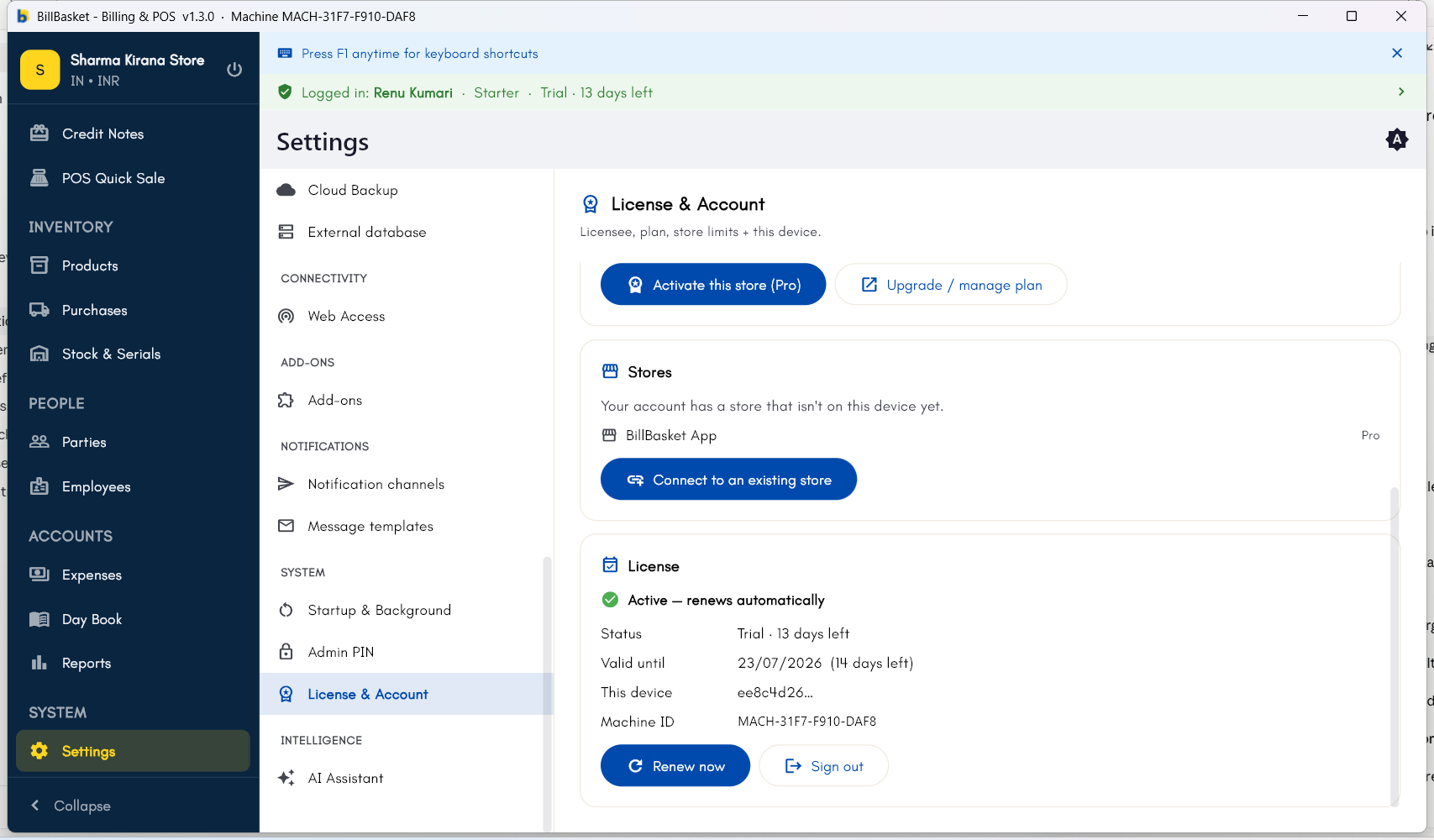
Try it: Sharma Kirana Store
1
Open Settings and go to License & Account
Rajesh Sharma signs in to BillBasket on his Windows counter PC and opens
Settings → License & Account to check his plan.
2
Check the Trial/Pro Store count
He sees “Pro Stores: 2 of 2” — his plan’s two device/store slots are both
in use, one of them an old Android phone Suresh briefly used during a
busy festival week.
3
Sign out the old device
Rajesh picks up the old phone, opens Settings → License & Account
there, and taps Sign out. It immediately signs out and frees a slot.
4
Sign in on the new device with the freed slot
With the slot free, Rajesh signs in with the same BillBasket account on
Suresh’s new work phone, which activates automatically against the
freed slot.