

Understanding the fields
- Arrange / gear icon (Windows and tablet) — enters edit mode on the wide-screen dashboard, where you drag the real cards into a new order or toggle any of them off directly on the dashboard itself.
- Long-press a tile (phone) — since dragging cards around doesn’t work
well on a small phone screen, long-pressing a tile instead opens a menu
with two options:
- Hide — removes just that tile.
- Rearrange widgets — opens the full reorder sheet described below.
- Rearrange widgets sheet — a scrollable list of your currently visible blocks, each with a drag handle to reorder it and a hide icon to remove it, followed by an Add widget section listing any hidden blocks so you can bring them back.
- Reset layout — inside the rearrange sheet, this restores the original default order and un-hides every block. It doesn’t just reorder — it also makes every previously hidden tile visible again, so use it if your dashboard has gotten too customized to find something.
Your show/hide and order choices are saved per store (not per device), but
each device you’re logged into keeps its own copy of the layout — so
reordering the dashboard on your Windows PC won’t rearrange it on your
phone.
See it on your device
- Windows PC
- Phone
- Tablet
Dashboard edit mode after tapping the Arrange icon — each tile now
shows a drag handle (top-left) and a hide/eye icon (top-right), with
the Add widget panel on the right and a Reset layout link both
in the panel and next to the title.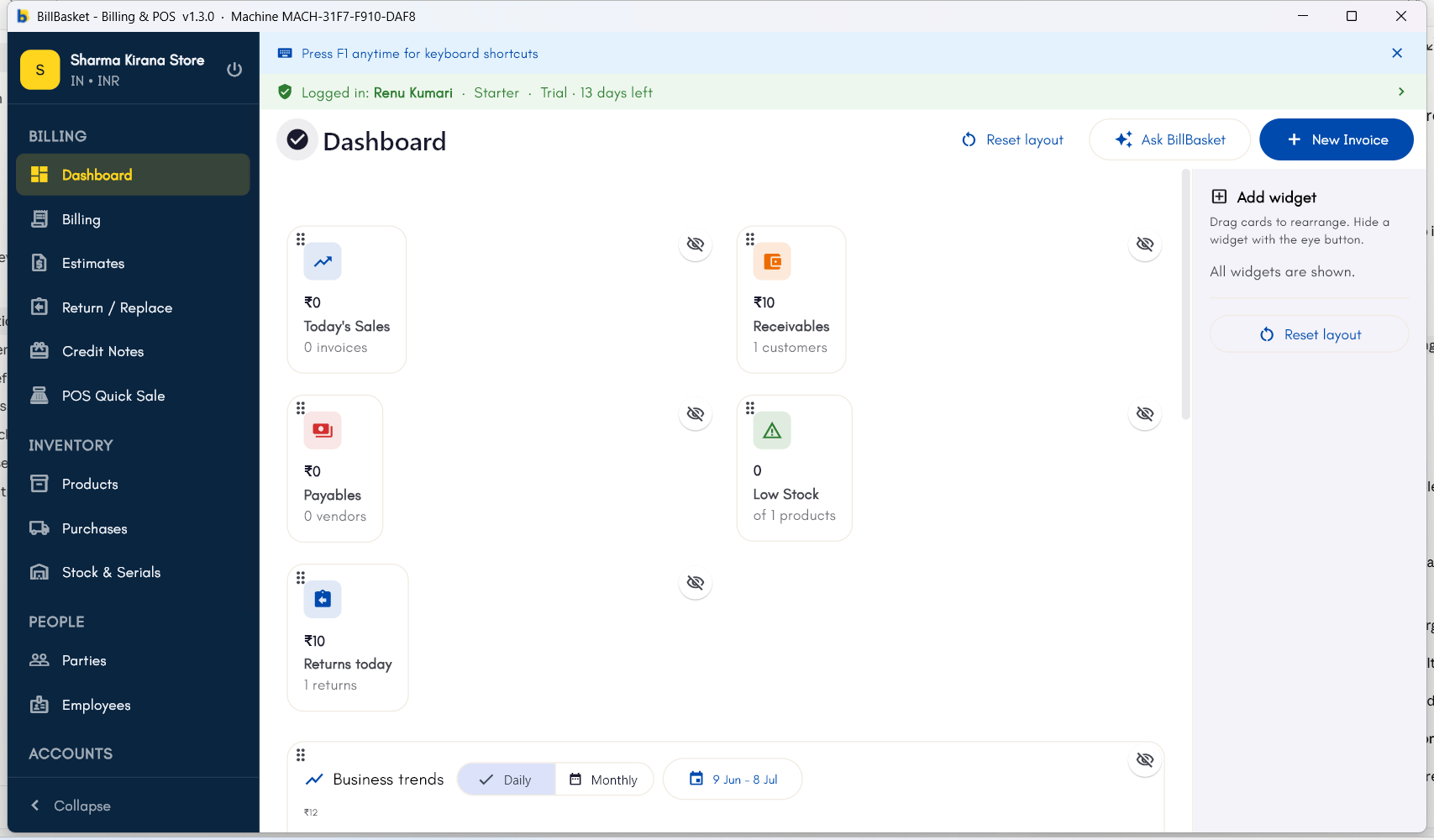
Try it: Sharma Kirana Store
1
Open edit mode on the Windows dashboard
Rajesh Sharma cares most about tracking customer dues, like what Meena
Devi still owes, so he wants that tile at the top of his Windows
dashboard. He taps the gear icon to enter edit mode.
2
Drag the Receivables tile to the top
He drags the “Receivables” tile above the sales tile so it’s the
first thing he sees.
3
Hide a tile he doesn't use
Rajesh doesn’t track returns closely day-to-day, so he toggles off
the Return Stats tile to reduce clutter.
4
Long-press to rearrange on his phone
On his Android phone, Rajesh long-presses a tile, taps “Rearrange
widgets,” and reorders his dashboard the same way there — his phone
keeps its own copy of the layout, separate from the counter PC.