

Understanding the fields
- Customer — same customer picker as billing. Optional on an estimate, since you can quote a price before you’ve settled on who exactly it’s for.
- Estimate number — generated automatically, separate from your invoice numbering.
- Estimate date — defaults to today.
- Valid until — an optional cut-off date shown on the estimate PDF. Leave it blank for “no expiry.” Setting it helps your reports flag quotes that have gone stale without a response.
- Line items — products or services, quantities, and prices, entered the same way as billing. Unlike a purchase or invoice, estimate line items don’t ask for unit cost, batch, or serial number — those only get captured once the estimate becomes a real invoice.
- Discount — a flat or percentage discount on the total, same as invoicing.
- Status — moves through draft → sent → accepted → converted (or
rejected/expired if it doesn’t go through). You don’t set this
directly; it updates as you share the estimate and act on it. Only
Convert to Invoice moves an estimate to
converted— at that point it’s stamped with the invoice it became, and the line items, customer, and pricing carry across so you don’t re-type anything.
Once an estimate is converted, it stays linked to the invoice it created —
editing it afterward won’t change the invoice. Make revisions before
converting.
See it on your device
- Windows PC
- Phone
- Tablet
A new estimate with a customer and one line item added — note there’s
no cost/batch/serial column here, since those only get captured once
this becomes a real invoice. Save & Convert in the top-right turns
it straight into an invoice in one step.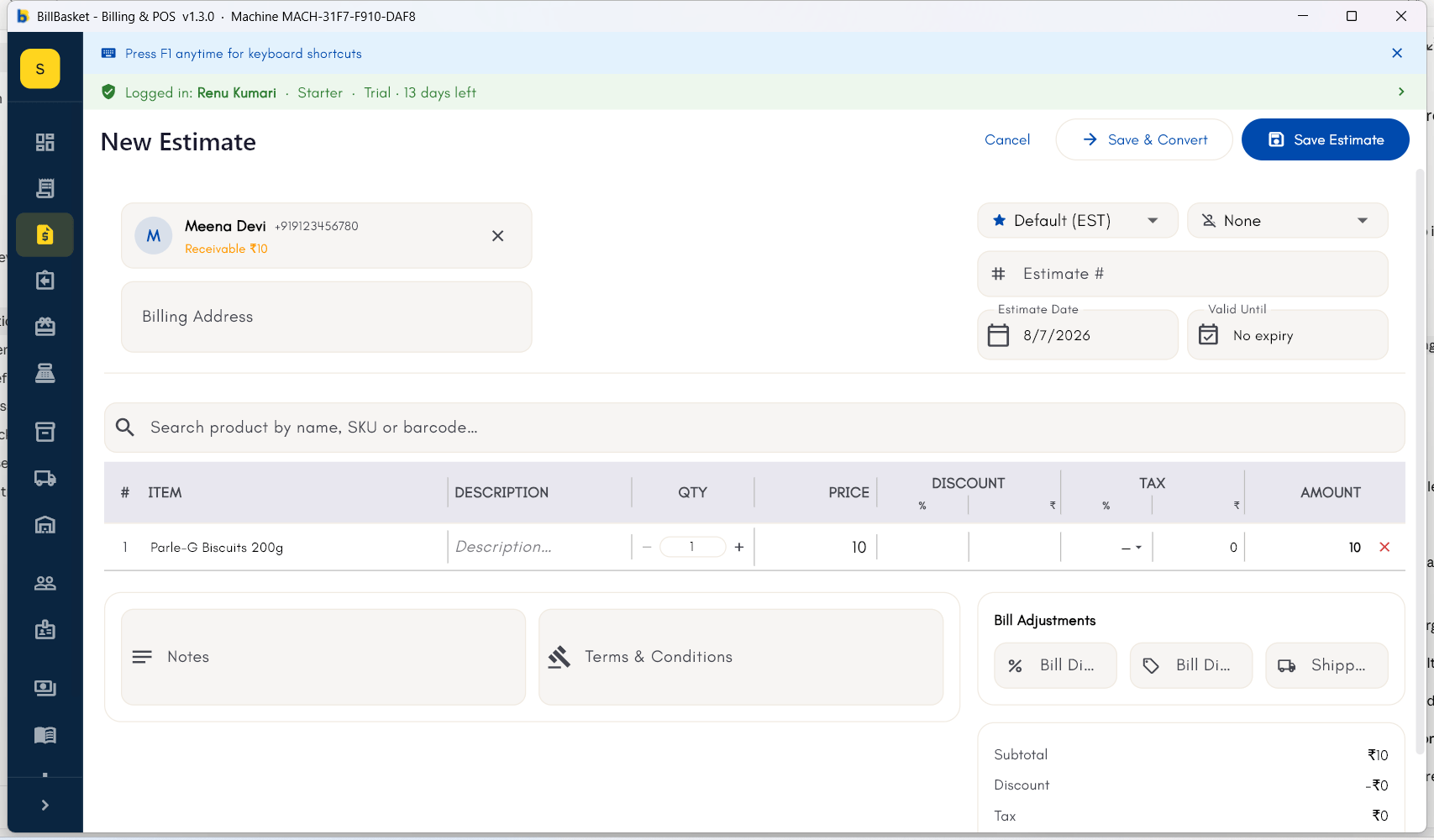
Try it: Sharma Kirana Store
1
Create an estimate instead of an invoice
Meena Devi wants to know the cost of a large festival order — several
cases of Parle-G Biscuits, Tata Salt, and Amul Milk — before committing.
Rajesh Sharma creates an estimate instead of an invoice.
2
Build the estimate like a normal bill
He adds the items and quantities the same way he would for billing,
and shares the estimate with Meena so she can review the total.
3
Revise it if the customer asks for changes
Meena asks to drop the milk quantity, so Rajesh edits the estimate and
shares the updated version with her.
4
Convert it to an invoice once agreed
Once Meena agrees to the revised price, Rajesh converts the estimate
into a real invoice with one tap — the items carry over without
needing to be re-entered.